OpenVox logo

OpenVox

Built for Apple Silicon Macs

Stop paying per character.Run AI voices locally on your Mac.

Generate lifelike voiceovers, design brand-new voices, clone reference voices, and turn books into audio without turning every draft into a cloud upload.

Download on Mac App Store

Download for Free

Rated ⭐⭐⭐⭐⭐ on the App Store · Trusted by creators · No account required

Voice library

300+

Languages

23

AI Models

4

OpenVox AI - Featured on There's An AI For That
Openvox - Local Voice AI - Studio Quality Local TTS for MAC | Product HuntOpenVox - Local TTS for Mac on StartupTrusted

Stop Sending Scripts Away

Your scripts, drafts, client work, and private documents stay on your Mac instead of getting pushed through another cloud dashboard.

Stop Paying Per Character

OpenVox Free gets you started, and Pro removes recurring usage anxiety with a one-time upgrade instead of monthly voice bills.

Built for Apple Silicon

Powered by Apple Silicon and MLX for fast inference on M1, M2, M3, and M4 chips with hardware acceleration.

Offline for Core Workflows

After one-time model download, core generation works offline. Optional transcript assistance may use Apple Speech Recognition.

The problem

Most AI voice tools charge you to lose control.

You pay monthly, watch character quotas climb, and still have to upload scripts, client work, or private documents to someone else's servers. That is a bad trade for anyone doing serious voice work.

Your content is processed by third parties
Usage is tracked and logged
You need a constant internet connection
Pricing is tied to subscriptions or per-character limits
Quotas and rate limits get in the way of actual work

The solution

OpenVox keeps the work on your Mac and the cost under control.

No OpenVox backend. No cloud AI inference for core generation. Just local, Apple Silicon-optimized voice workflows with explicit permission boundaries where optional external services are involved.

Zero OpenVox data collection
Core generation workflows run locally after setup
Unlimited usage with no per-character billing
Apple Silicon optimized with MLX
Clear permission boundaries for optional platform-assisted features
User Testimonials

What early App Store reviewers are saying.

These are real App Store reviews from recent OpenVox users, focused on ease of use, local-first workflows, and responsive support.

App Store reviewMar 28, 2026

Great tool, soon it will be perfect for my needs

This tool is way easier, and works great. I was happy to pay for pro because I plan to generate large numbers of audio files.

MajesticCapybara

Netherlands

Bulk importing mentioned in this review has already been added in version 1.2.3.

App Store reviewMar 25, 2026

Polished App with Helpful Features

Clean polished app with several useful features for text to speech use cases. And everything is running locally, so that’s a bonus.

Aayush Chakraborty

India

App Store reviewMar 26, 2026

Fast Service

I strongly encourage everyone to support him. He is great to work with and provides incredibly fast service.

Mzansar Z

India

Download on Mac App Store

Free download · No account required

Why Mac users care

Mac users are ignored by most AI voice tools.

Most voice AI companies optimize for browser dashboards and cloud billing. OpenVox is built specifically for Apple Silicon, so Mac creators get native performance instead of a compromised fallback.

Most AI voice apps treat Mac as an afterthought

They are built around web dashboards, Windows-first tooling, or cloud workflows that ignore how Mac creators actually work.

Apple Silicon changes the economics

With MLX and on-device acceleration, your Mac can handle core speech generation locally instead of renting cloud compute for every job.

OpenVox is designed for native Mac workflows

Local storage, keyboard-friendly controls, native playback, and hardware-optimized inference make it feel like a Mac app instead of a web wrapper.

Core features

Built for real voice work, not just demos.

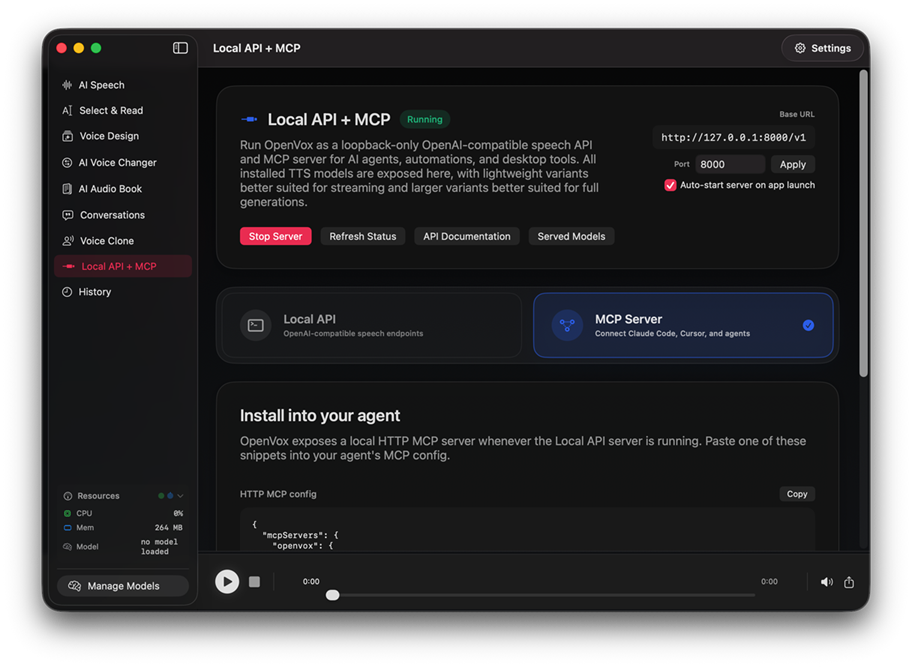
OpenVox combines fast local TTS, reusable custom voices, audiobook tooling, voice conversion, and local-first history in one macOS app.

Kokoro-82M

Speed & long-form generation

  • 60+ voices
  • 9 languages
  • Great for scripts, articles, and batch generation

Chatterbox

Quality, cloning, and premium output

  • 240+ voices
  • 23 languages
  • Built for voice cloning and high-fidelity speech

Qwen3 TTS + Voice Design

Custom reusable voices

  • Design voices from text prompts
  • Generate samples locally
  • Reuse designed voices across workflows

AI Speech Generation

Convert text into expressive speech with controls for speed, temperature, CFG weight, exaggeration, normalization, and silence removal.

300+ Voices Across 23 Languages

Browse by model, language, gender, age, or accent, preview voices, and save favorites for repeated work.

AI AudioBook Generation

Import EPUB, PDF, or text files, manage chapters, batch process books, and customize voices per chapter.

Voice Design

Describe a tone, style, age, or personality in natural language and save the best generated voice as a reusable preset.

AI Voice Changer

Import MP3 or WAV files, convert them to a target voice, and process long audio with automatic chunking and progress tracking.

Voice Cloning

Upload or record samples, use optional transcript help, review the transcript, and manage multiple cloned voices locally.

Generation History

Search, filter, replay, export, and reuse settings from past generations, all stored locally with SwiftData.

Multi-Format Export

Export in WAV, MP3, or M4A depending on your workflow and keep everything under your control on disk.

macOS-Native Design

A polished glassmorphism interface with dark mode, keyboard shortcuts, and playback controls built for Apple hardware.

Download on Mac App Store

Free download · No account required

How it works

Three steps from text to finished audio.

1

Type or Import Your Text

Paste text directly or import EPUB, PDF, and text files for chapter-by-chapter audiobook workflows. No subscription gate, no cloud dependency.

2

Choose Voice & Model

Use Kokoro-82M for fast long-form generation, Chatterbox for premium quality and cloning, or Voice Design for entirely new custom voices.

3

Generate & Export

Run generation locally, monitor real-time progress, and export finished audio as WAV, MP3, or M4A.

Use cases

Made for creators, publishers, and privacy-sensitive work.

Content Creators

Produce voiceovers for videos, podcasts, and social clips without expensive recording setups or monthly voice credits.

Audiobook Publishers

Generate complete audiobooks from EPUB, PDF, or text files with chapter-by-chapter management and voice control.

Voice Artists

Clone your own voice, transform recordings, and create reusable custom voices for branded narration or character work.

Accessibility

Read articles, emails, and documents aloud with natural voices across 23 languages for easier listening and review.

Privacy-Sensitive Work

Process legal, medical, research, or confidential material without pushing core generation workloads to cloud TTS providers.

Writers & Editors

Hear prose read back to catch flow issues, pacing problems, and awkward phrasing before publishing or recording.

Download on Mac App Store

Free download · No account required

Privacy guarantee

No OpenVox servers. Local AI by default.

Core speech generation, voice design, audio playback, saved voices, and voice conversion run on your Mac using Apple Silicon.

OpenVox has no analytics, no advertising trackers, and no OpenVox-controlled database for your generation content.

Optional transcript help for uploaded cloning samples uses Apple Speech Recognition only if you choose it and grant permission.

Monitor network activity yourself after model download.
Core generation and playback stay local after setup.
Permission prompts are explicit for optional platform-assisted features.
Read the Privacy Policy
Technical details

Apple Silicon optimized.

System requirements

macOS 15.0 or later, Apple Silicon, and roughly 1-2GB of model cache depending on what you install.

Performance

MLX uses Apple's unified memory architecture for fast, efficient local inference on M1, M2, M3, and M4 chips.

Model downloads

Internet access is needed only for one-time model downloads from Hugging Face and optional Apple transcript assistance during cloning.

What's included

Everything shipping in OpenVox today.

Three AI models: Qwen3, Kokoro-82M and Chatterbox
300+ professional voices across 23 languages
AI Speech generation with real-time progress tracking
AI AudioBook generation with EPUB, PDF, and text import
AI Voice Changer for transforming existing audio
Voice Cloning from your own samples
Voice Design for reusable custom voices
Generation History with search, filter, and replay
WAV and MP3 export
Local-first operation after model download
Download on Mac App Store

Free download · No account required

Why choose OpenVox

Freemium, no subscription.

FeatureOpenVox FreeOpenVox ProCloud TTS
Cost$0$19.99 once$10-50/month
Daily characters5,000/dayUnlimitedPay per character
Voice library300+ voices300+ voicesUsually limited by plan
PrivacyLocal-firstLocal-firstCloud-based
Offline core generationYesYesNo
Lifetime accessYesYesNo
OpenVox trackingNoneNoneUsually present
Commercial useIncludedIncludedOften tier-dependent
Pricing

Start free. Upgrade when you're ready.

Privacy-first AI voice tools on your Mac, with a generous free tier and a one-time Pro unlock.

OpenVox Free

$0forever
  • 5,000 characters per day for AI speech generation
  • 100 seconds per day for voice conversion
  • 300+ AI voices across 23 languages
  • Three models: Qwen3, Kokoro-82M and Chatterbox
  • 3 custom voice clones and 10 saved voice designs
  • 2,000 characters per generation
  • AI AudioBook workflows with EPUB import
  • WAV export and local AI generation after model download
Download Free - Run AI voices locally in 2 minutes
Best value

OpenVox Pro

$19.99one-time purchase
  • Unlimited generations, characters, and voice conversion
  • Unlimited voice clones and saved voice designs
  • No per-generation character limits for long-form work
  • Batch mode and MP3 export
  • All future AI models included
  • Lifetime updates and commercial use license
  • Priority support
  • No subscriptions and no recurring fees
Unlock Pro - Stop paying recurring voice fees
FAQ

Common questions, answered directly.

Ready to transform your text?

Generate natural speech entirely on your Mac.

No cloud AI inference, no tracking, and no monthly bill. Start free or unlock Pro once and keep it.

Download on Mac App Store

Download Free - Run AI voices locally in 2 minutes.
OpenVox AI - Featured on There's An AI For That
Openvox - Local Voice AI - Studio Quality Local TTS for MAC | Product HuntOpenVox - Local TTS for Mac on StartupTrusted